
 ChatGPT
 Perplexity
 Gemini
 Claude
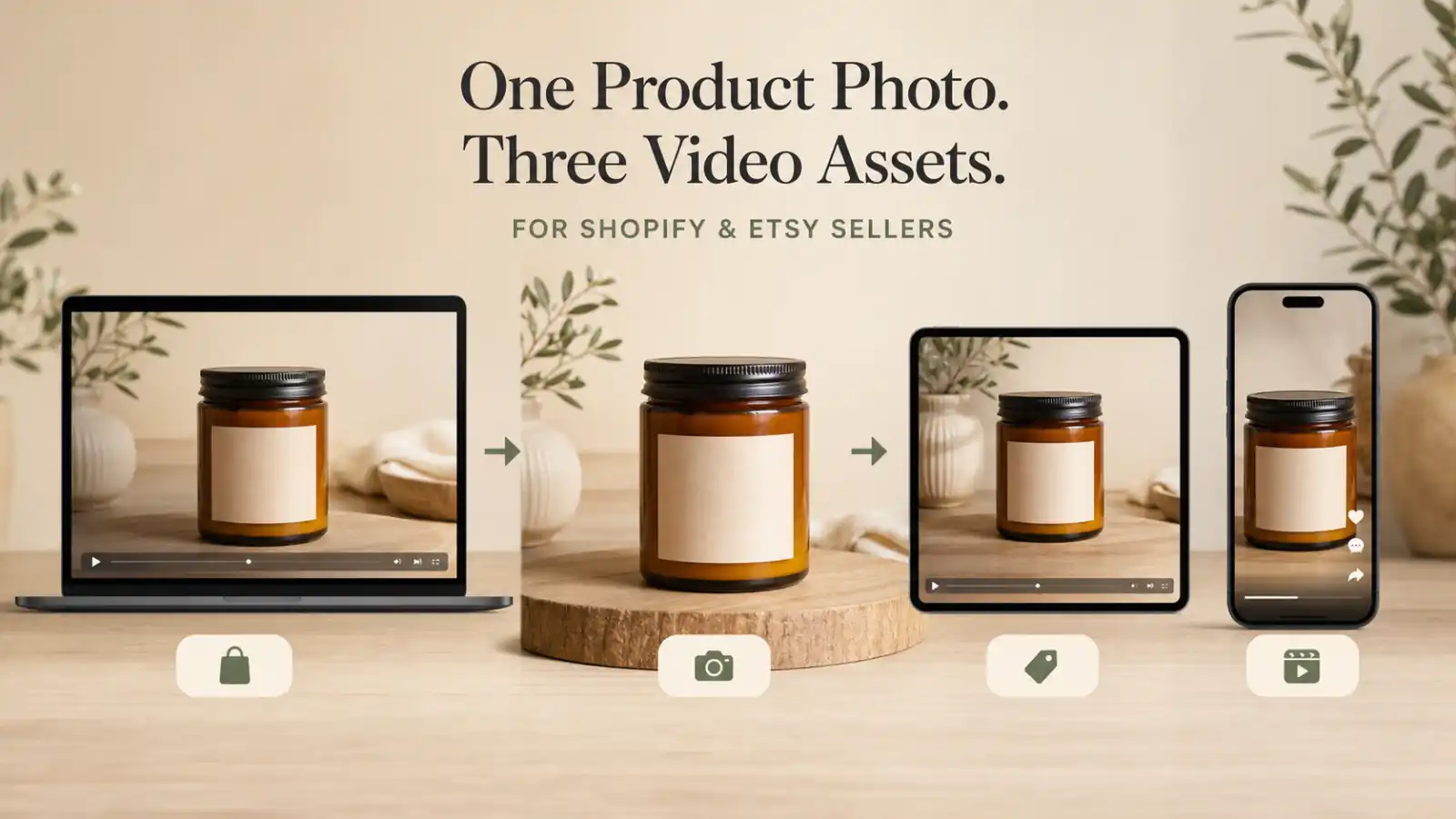
One product photo can produce several useful videos, but the same export should not go everywhere.
A calm Shopify product-page loop, a trustworthy Etsy seller asset, and a 9:16 paid ad have different jobs, limits, and risks. The expensive mistake is not using motion that is too subtle. It is publishing an AI clip that changes the label, material, scale, quantity, or product promise.
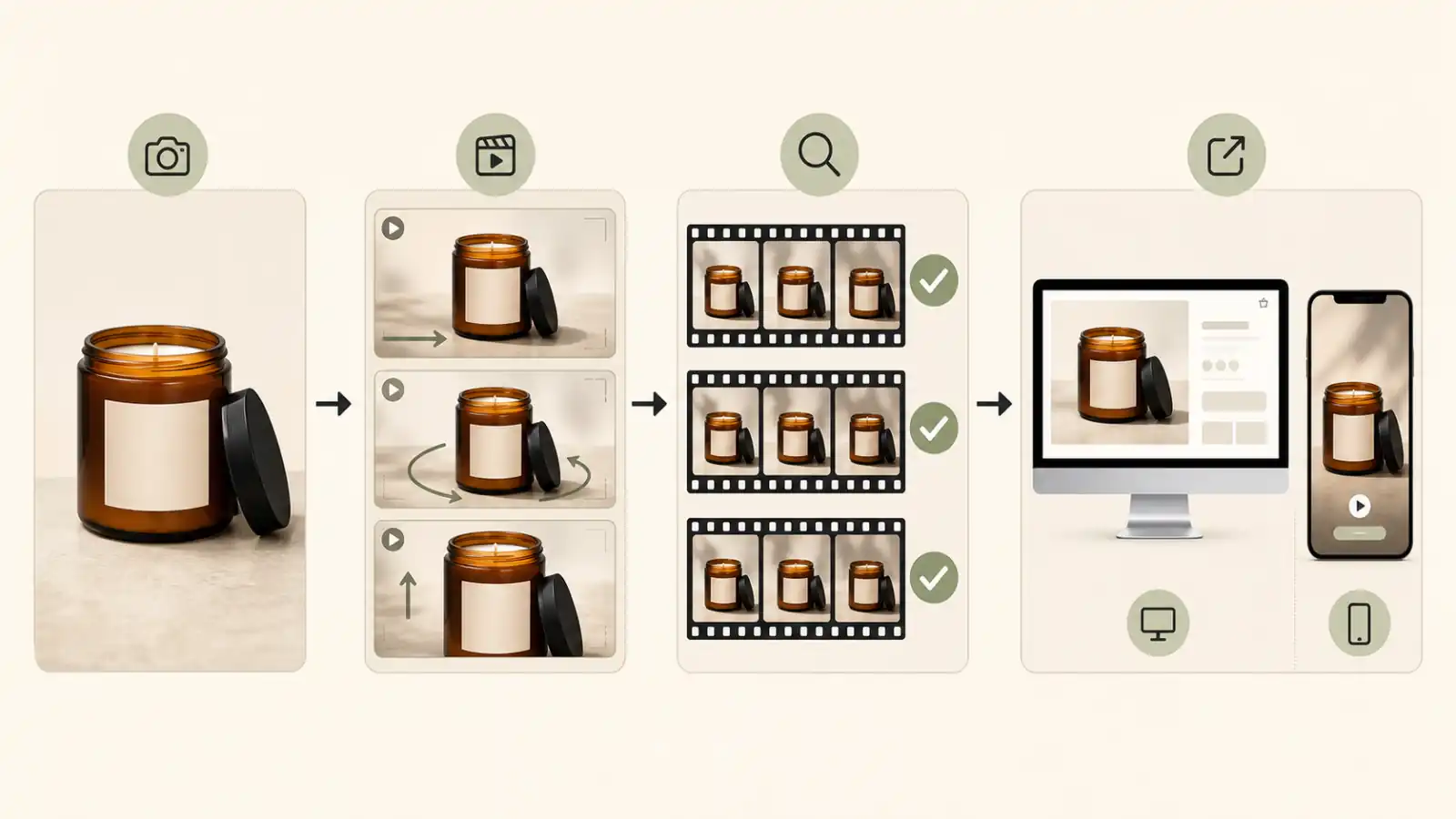
This guide gives Shopify merchants and Etsy sellers a controlled workflow: create one accurate master clip, inspect it like product evidence, then adapt it for each channel instead of asking the AI model to make a complete campaign in one generation.
Quick Answer
To make AI product video ads from one image, begin with a real, high-resolution product photo you have the right to use. Define one sales angle, generate a restrained 5-8 second master clip, and tell the model exactly which product details must remain unchanged. Review the first, middle, and last frames before adding any price, offer, caption, audio, or call to action.
Once the master clip passes that review, create separate exports for the destination. A Shopify product page usually needs a calm, lightweight product loop. An Etsy seller may use an AI clip for off-platform promotion, but should be more cautious about listing media because Etsy emphasizes original, accurate product representation. A vertical paid ad needs a faster opening, a 9:16 crop, and safe space for platform controls.
One Product Image, Three Different Video Jobs
The phrase “product video” hides several different tasks. A video that helps a shopper inspect a product is not automatically a good scroll-stopping ad, and a dramatic social ad is not automatically appropriate listing media.
| Channel or placement | Primary job | Practical first version | Audio approach | Main risk |
|---|---|---|---|---|
| Shopify product page | Help the shopper understand the product and its mood | 5-8 second restrained loop that matches the theme's media ratio | Muted or optional | Slow loading, distracting motion, or product details changing |
| Etsy listing | Build confidence in the real item, craft, material, or process | Prefer real product, handling, or making-process footage | Etsy removes audio after upload | An AI render may weaken trust or conflict with original-media expectations |
| Etsy seller's off-platform social post | Attract attention and send interested shoppers to the listing | Short product-safe vertical clip with one visual idea | Add music or voiceover after generation | The promotion suggests features the real product does not have |
| Reels or TikTok-style paid ad | Test hooks, benefits, and offers | 6-10 second 9:16 version with a strong first two seconds | Add platform-appropriate audio in editing | UI covers the product, or the ad does not match the landing page |
| Feed ad | Test a compact product and benefit combination | 1:1 or 4:5 derivative of the approved master | Add later | Important product details are lost during cropping |
Shopify's product media documentation permits uploaded product videos up to 10 minutes, 1 GB, and 4K in MP4, MOV, or WebM format. Those are upload limits, not creative targets. A small store usually benefits from a much shorter and lighter product-page asset that appears quickly and does not compete with the add-to-cart decision.
Etsy currently allows up to two listing videos. Each can be 3-15 seconds, up to 100 MB, and audio is removed after upload. Etsy recommends at least 1080px resolution and states that the video ratio should be 2:1 or 1:2. Because those requirements can change, check the help page again before exporting a large catalog.
The creative requirement is different for vertical ads. Meta recommends Reels creative built for 9:16 with audio and key elements inside the safe zone, while TikTok tells advertisers to keep products and important messages clear of interface elements. Use those principles as layout constraints, not as permission to invent a more impressive version of the product. See the current Meta Reels guidance and TikTok Creative Center guidance before launching.
What You Need Before Generating
AI video quality starts before the prompt. The source image acts as the model's first frame and as your product truth reference. If the source is blurry, heavily compressed, reflective, or too tightly cropped, the model has to guess what the product should look like during motion.
Source Image Checklist
Use a product image that has:
- One clear hero product or a deliberately arranged bundle.
- Sharp edges around the package, lid, handle, cap, or silhouette.
- A readable label area, even if the smallest letters will not survive video generation.
- Clean light without glare covering important product information.
- Enough background around the product for a push-in and a vertical crop.
- Accurate color and material representation.
- No third-party marks, artwork, or people you do not have permission to use.
Use the original file rather than a compressed marketplace thumbnail. If the product photo is square, extend or rebuild the background before asking for a vertical ad. Cropping a tight square photo directly to 9:16 often makes the product too large or pushes it under the interface.
Create a Product Truth Sheet
Before generation, write down the facts the video must preserve. This does not need to be a formal brand document. A short note is enough:
Product: amber glass candle jar
Must stay unchanged: jar shape, amber color, black lid, label position,
one wick, one product, approximate proportions
Allowed motion: camera push-in, warm light shift, background shadow movement
Not allowed: extra flame, new label text, gold lid, second jar, melting glass,
claims about burn time or scent strength
This truth sheet separates visual atmosphere from product facts. Warm light can move. A background leaf can cast a subtle shadow. The number of items in the package cannot change.
For US advertising, the FTC's small-business advertising guidance says ads must be truthful and non-deceptive, and advertisers need support for express and implied objective claims. AI does not change that standard. If the generated scene implies that a bag is waterproof, a candle is larger than it is, or a skincare product produces an unverified result, a small disclaimer may not correct the overall impression.
Step-by-Step AI Product Ad Workflow
The goal is not to make the most dramatic video possible. It is to find the smallest amount of motion that makes the real product easier to notice or understand.
Step 1: Choose One Sales Angle
Choose one reason for the video to exist:
- Detail: direct attention to a clasp, texture, finish, label, or edge.
- Material: show a plausible light sweep across glass, metal, ceramic, or fabric.
- Mood: connect the item to a season, room, occasion, or visual atmosphere.
- Process: support a handmade story, while using real process footage when authenticity matters.
- Benefit cue: visually support a substantiated feature without simulating a result the product cannot deliver.
- Offer: leave clean space for a verified price, launch date, or promotion added later.
Do not combine every angle in one clip. “Premium, cozy, waterproof, handmade, holiday gift, 30% off” is not a prompt; it is an unprioritized campaign brief.
Step 2: Build a Product-Safe Master Prompt
Use this formula:
Product identity + sales angle + camera movement + environmental motion
+ lighting and mood + duration and ratio + preservation constraints
Example:
Create a 7-second product hero video from this real amber glass candle photo.
Use a slow camera push-in, a gentle warm light shift, and subtle background
shadow movement. Keep the jar shape, amber glass color, black lid, label
position, wick count, product quantity, and proportions unchanged. No new
text, no extra products, no material transformation, and no camera move that
reveals details not visible in the source image.
The last sentence is the control layer. It tells the model that this is a product representation task, not an invitation to redesign the item.
If you want to test the process with your own source image, turn one product photo into a controlled first video variation before building the other channel exports.
Step 3: Generate Three Controlled Variations
Generate several variations, but change one motion variable at a time:
- Variation A: slow camera push-in.
- Variation B: locked camera with a soft light sweep.
- Variation C: subtle lateral camera move with the product stationary.
Keep the duration, source image, lighting direction, and preservation constraints the same. This makes the comparison useful. If one variation is more stable, you know the motion choice helped. If every part of the prompt changes, you learn very little from the result.
Avoid a full 360-degree spin from one front-facing image. The model does not know the real back, sides, seams, or closure. It must invent them. A small orbit can work for a visually simple product, but even that requires close review.
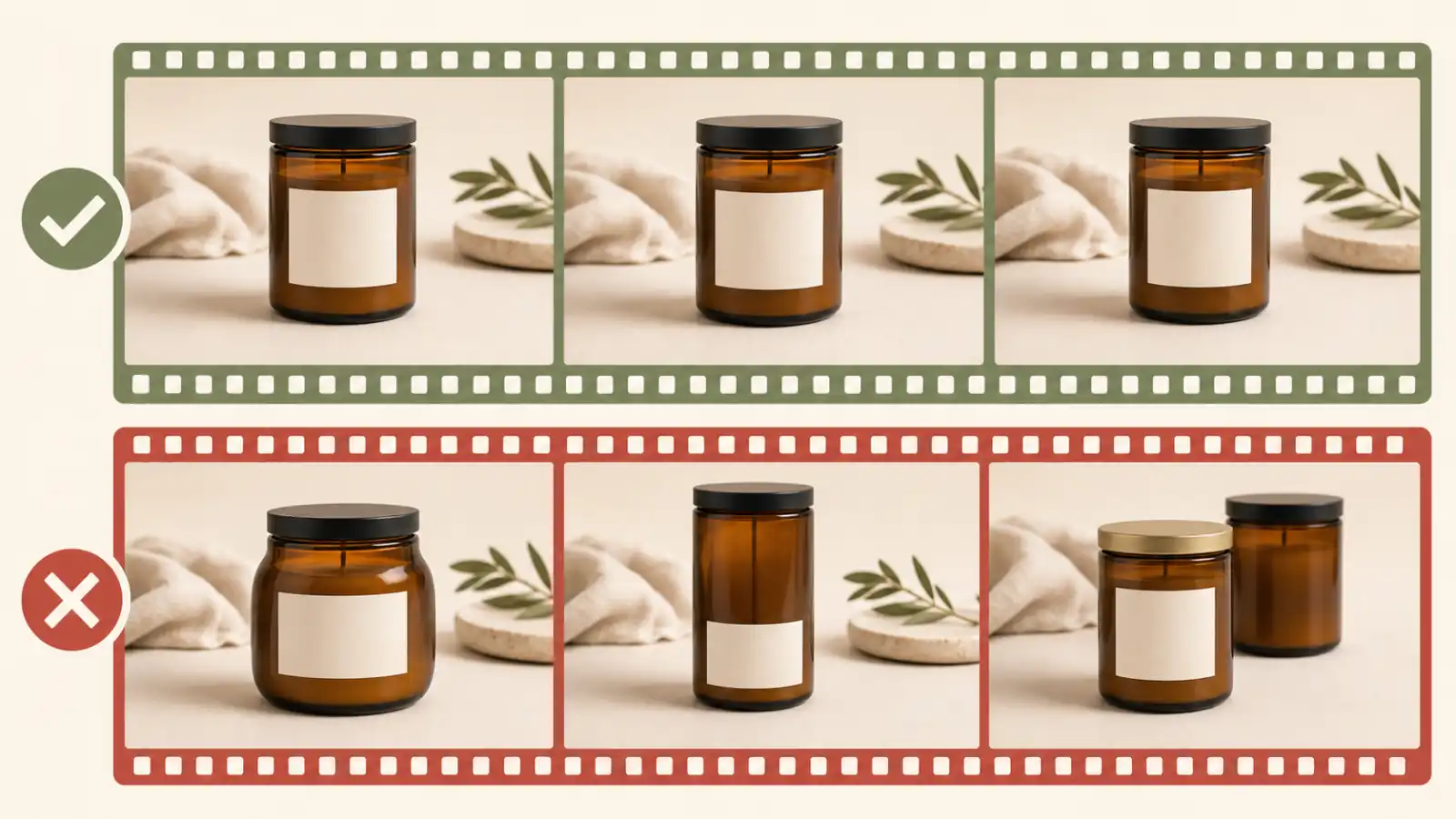
Step 4: Review the First, Middle, and Last Frames
Watch the full clip, then pause it at three points. Compare each frame with the source photo.
Check:
- Product shape and proportions.
- Label, logo, and decorative element placement.
- Cap, lid, handle, zipper, clasp, sole, or hardware.
- Material behavior and reflections.
- Color and finish.
- Product count and bundle contents.
- Any newly invented text, controls, accessories, hands, or props.
- The visual claim made by the scene.
An attractive first frame does not rescue a misleading last frame. If a jar becomes taller, a necklace gains a stone, or a coffee bag changes size, reject the output instead of hiding the error with a fast cut.
Step 5: Add Copy, Price, CTA, and Audio After Generation
Video models are useful for motion, but they are unreliable typesetters. Generate a clean product shot first, then add:
- Product name.
- One verified benefit.
- Price or discount.
- Shipping or launch information.
- Captions.
- Call to action.
- Music, voiceover, or sound design.
This keeps the text accurate and makes the master clip reusable. The same approved motion can support “New arrival,” “Gift-ready packaging,” and “See available colors” without paying to regenerate the product every time.
Export for Shopify, Etsy, and Paid Social
Create the master at the highest practical quality, then make channel-specific copies. Do not repeatedly upload, download, and recompress the same social file.
Shopify Product-Page Version
A Shopify product-page video should help with the buying decision rather than behave like an interruptive ad.
Use these defaults:
- Keep it around 5-8 seconds for a simple product hero loop.
- Match the aspect ratio of nearby product media so the gallery does not jump.
- Start with a clear product frame instead of a blank fade.
- Use restrained motion and a clean loop point.
- Compress the file and test the product page on a real phone connection.
- Keep the original product photo as a primary source of detail.
- Confirm that the current store theme supports product video.
Shopify supports much longer files, but a 10-minute upload limit does not mean a product hero should be 10 minutes. Product instructions, demonstrations, testimonials, and brand stories may justify longer media. A single-photo AI animation usually does not.
Etsy Listing Video vs Off-Platform Promotion
Etsy needs the most careful distinction in this workflow.
The current Etsy Seller Policy requires sellers to accurately represent their items and generally use their own photographs or video content rather than stock photos or artistic renderings. It also prohibits false, deceptive, or misleading uploaded content. The policy does not clearly resolve every case where a seller animates their own real product photo with AI.
For that reason, the safer recommendation is:
- Use real footage of the physical item, making process, scale, texture, packaging, or customization as Etsy listing media.
- Use AI product animation primarily for the seller's off-platform social posts and ad experiments.
- Do not use an AI clip to simulate handmade work that was not performed.
- Do not show a custom variation, material, finish, or quantity the buyer will not receive.
- Recheck Etsy's current rules or ask Etsy support before rolling AI-derived listing video across a catalog.
This is not a claim that every AI-assisted listing video is prohibited. It is a recognition that an Etsy listing is a trust document, and a real process clip may do more selling work than a polished animation.
Reels and TikTok-Style Version
For a vertical ad:
- Export at 9:16.
- Keep the product and main message inside the platform safe zone.
- Make the product recognizable in the first second.
- Introduce one visual change in the first two seconds.
- Keep important copy away from the top, bottom, and interaction rail.
- Add readable captions for sound-off viewing, even if the final placement often plays with sound.
- Ensure the visual, price, variant, and offer match the landing page.
Do not treat a vertical crop as the final creative. A wide Shopify loop may place the product too low or too close to an edge. Reframe from the approved master so the product remains large enough to recognize but still leaves room for interface controls and captions.
Copy-Paste Prompt Templates
These templates use the same preservation logic for different jobs. Replace the bracketed details with facts about the real product.
Shopify Product-Page Loop
Create a calm 6-second product-page loop from this real [product] photo.
Use a slow camera push-in and a subtle light shift across the [material].
Keep the [shape], [color], [label or logo placement], [packaging], [hardware],
[quantity], and proportions unchanged. The first and last frames should feel
compatible for a clean loop. No new text, no extra items, no transformation,
and no invented product features.
Best for bottles, candles, coffee bags, ceramic pieces, shoes, jewelry, and packaged goods where light and camera movement can add depth without changing the object.
Etsy Seller Off-Platform Social Clip
Create a 7-second vertical social video from this real handmade [product]
photo. Use a gentle close camera move, natural window light, and subtle
background shadow movement that supports a warm small-studio mood. Preserve
the exact product shape, handmade details, material, color, finish, size
impression, and quantity. Do not simulate a making process, add tools, add
hands, or show a variation that is not present in the source image.
Use this for social promotion that points to an Etsy listing. For the listing itself, real process or product footage remains the stronger trust asset.
9:16 Paid Social Hook
Create an 8-second 9:16 product ad from this real [product] image. Show the
product clearly in the first second. Use [slow push-in / subtle lateral move]
with [one plausible environmental motion]. Keep the product centered inside a
mobile safe area with negative space for a short headline and CTA. Preserve
the exact product shape, label, logo placement, color, material, packaging,
quantity, and proportions. No new text, no extra accessories, no impossible
demonstration, and no product transformation.
Add the headline, offer, caption, CTA, and audio after the product motion has passed review.
A/B Test Without Wasting Generations
AI makes it easy to produce many clips. That does not make every clip a useful test.
| Test | Keep fixed | Change one variable | What to measure |
|---|---|---|---|
| Camera test | Product, background, duration, copy | Push-in vs locked camera vs lateral move | Hold rate and completion rate |
| First-frame test | Motion, offer, landing page | Tight product crop vs wider contextual crop | First seconds viewed and thumb-stop behavior |
| Benefit test | Approved video master | One substantiated benefit line | Click-through rate and product-page visits |
| Format test | Product, motion, copy | 9:16 vs 4:5 vs 1:1 | Placement-level cost and engagement |
| CTA test | Video and offer | “Shop now” vs “See details” | Qualified clicks and conversion |
| Mood test | Product and camera move | Warm natural light vs clean studio light | Audience and placement response |
Name the exports so the change is visible:
candle_pushin_hook-a_9x16_v01.mp4
candle_static_hook-a_9x16_v01.mp4
candle_pushin_hook-b_9x16_v01.mp4
Avoid naming every file final-final-2.mp4. A simple naming system protects the test history when several products and offers are running at once.
Judge a creative with store and ad data rather than adjectives. A clip can look “premium” and still fail to earn a click. Another can look simple but make the product immediately understandable.
Common Problems and Fixes
| Problem | Likely cause | Better fix |
|---|---|---|
| Logo or label drifts | Text is small, source is compressed, or motion is too strong | Use a sharper source, reduce motion, and explicitly lock the label area |
| Bottle, box, or jar changes shape | Rotation or transformation asks the model to invent geometry | Use a push-in, locked shot, or light movement |
| Material behaves incorrectly | Prompt adds an effect that conflicts with the real material | Describe the actual material and allow only plausible reflections or shadows |
| Product quantity changes | Background generation or wide camera motion creates duplicates | Lock quantity and simplify the scene |
| Video suggests an unsupported benefit | Visual metaphor becomes a performance claim | Remove the implication or verify and qualify the claim clearly |
| Shopify loop visibly jumps | First and last frames have different camera positions or lighting | Generate for loop compatibility or trim on matching frames |
| Vertical UI covers the product | The wide master was cropped without a safe-area review | Reframe from the source and test a real platform preview |
| Etsy media looks like a render | The animation is too polished or replaces real process evidence | Use real product or process footage for the listing |
| Ad looks generic | Motion is decorative but has no sales angle | Choose one detail, material, use case, or verified benefit before regenerating |
The best fix is usually a smaller instruction set, not a longer paragraph. Reduce camera movement, remove one environmental effect, and repeat the product invariants.
When One Product Image Is Not Enough
One image can support a product hero shot. It cannot prove every product fact.
Capture additional real images or video when:
- The back, side, interior, closure, or packaging contains important information.
- The buyer needs a trustworthy sense of scale.
- The product has moving parts or a function that must be demonstrated.
- The texture, fit, drape, or finish affects the buying decision.
- A personalized product needs a real finished example.
- The bundle contains several different items.
- The model repeatedly changes details a buyer would notice.
- The advertisement depends on a before-and-after or performance claim.
For handmade goods, a short clip of the real process may be more persuasive than another AI variation. For functional products, capture the actual mechanism. Use AI motion to extend good evidence, not to replace missing evidence.
Seller Publishing Checklist
Before publishing any version, confirm:
- Rights: You own or have permission to use the product photo, props, artwork, music, and voiceover.
- Product match: Shape, color, material, label, package, size impression, quantity, and accessories match the item for sale.
- Claim support: Spoken, written, and implied claims are accurate and supportable.
- Platform fit: Duration, ratio, resolution, file size, and format match the current destination requirements.
- Mobile layout: The product and essential message remain visible inside platform controls.
- Text accuracy: Price, discount, shipping, availability, and variation information match the landing page.
- Loop quality: Product-page loops do not jump or flash.
- Etsy trust: Listing media prioritizes real product and process evidence.
- Page speed: Shopify media is compressed and tested on mobile.
- Test design: The new version changes one clearly documented variable.
- Archive: The approved source, prompt, export, and rejected variants are easy to identify.
Once one variation has earned useful attention or sales data, expand the winning clip into a seven-day launch campaign instead of generating an unrelated set of visuals.
FAQ
Can I make an AI product video ad from one image?
Yes. One clean product image is enough for a short hero shot with a restrained camera move, light sweep, reflection shift, or background motion. It is not enough for an accurate 360-degree view, a complex product demonstration, or details that do not appear in the source photo.
Can I use an AI product video on a Shopify product page?
Shopify supports uploaded product videos and YouTube or Vimeo embeds, provided the store theme supports the media. A short AI product loop can be useful when it accurately represents the item, loads quickly, and supplements rather than replaces clear product photography.
Can Etsy sellers upload AI-generated listing videos?
Etsy's current seller policy emphasizes a seller's own photo or video content and accurate product representation, while excluding stock photos and artistic renderings in the general rule. Because it does not explicitly resolve every AI-derived animation of a real seller-owned photo, verify current guidance before using one as listing media. Real product, process, scale, and material footage is the safer default.
How long should an AI product video ad be?
Start with 5-8 seconds. That is enough for one product view and one motion idea. A paid social edit can extend to around 10-15 seconds when it adds a real hook, supported benefit, demonstration, testimonial, or offer rather than repeating the same generated shot.
What aspect ratio should Shopify and Etsy sellers use?
There is no single ratio for every destination. Match Shopify product media to the store's gallery design. Follow Etsy's current listing-video requirements for Etsy uploads. Use 9:16 for Reels and TikTok-style placements, and prepare 4:5 or 1:1 versions only when the ad placement needs them.
How do I keep a logo and label unchanged?
Use the clearest source file available, keep the product large in frame, choose low-amplitude motion, and explicitly preserve the logo and label position. Inspect several frames at full size. If exact small text is legally or commercially important, rely on the real product photo or add verified overlay text after generation.
Should I add prices and text inside the AI prompt?
Usually not. Add price, promotion, product name, subtitles, and CTA in a video editor. That produces more reliable typography, allows rapid copy tests, and prevents a useful master clip from becoming obsolete when the offer changes.
Build One Accurate Master Before Scaling
The useful promise of AI product video is not that one photo can replace every product shoot. It is that one accurate photo can become a controlled starting point for testing motion, format, and messaging.
Generate one restrained master clip. Verify that the real product survives every frame. Then adapt the approved motion for Shopify, Etsy seller promotion, and vertical ads instead of forcing one export everywhere.