
 ChatGPT
 Perplexity
 Gemini
 Claude
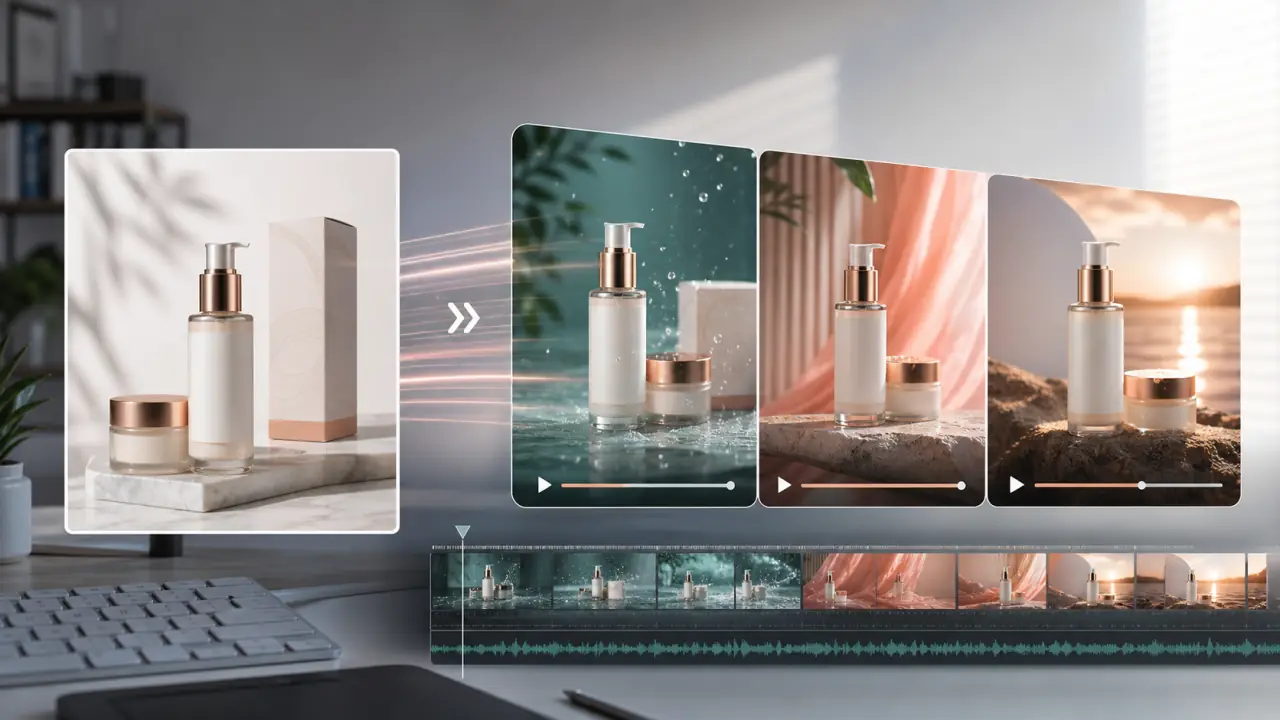
One product photo can do more than sit on a product page.
If the photo is clear, centered, and on-brand, it can become a short product ad: a slow push-in for a skincare bottle, steam behind a coffee bag, a warm glow around a candle, or a quick 9:16 clip for a TikTok-style feed. The hard part is not making the product move. The hard part is making the video feel like an ad while keeping the actual product accurate.
This guide shows a practical product image to video workflow for small e-commerce teams, Etsy sellers, Shopify stores, and creators who need a 5-8 second product video without booking a studio shoot.
Quick Answer
To turn a product image into a short ad, start with one clean product photo, write a prompt that defines the product, camera movement, light, background atmosphere, and what must stay unchanged, then generate a short 5-8 second video. Review the result frame by frame. If the label, shape, color, or packaging changes, lower the motion and add stronger preservation constraints.
The best AI product ads from one image are usually simple. A slow camera push-in, light sweep, reflection shift, subtle steam, gentle splash, or calm background movement often looks more premium than a dramatic transformation. If you want to test your own product image, start with the generator on photo to video ai and keep the first version restrained.
What Makes a Product Photo Good for AI Video
The product photo is the first frame and the visual contract. If the image is messy, blurry, or crowded, the video model has to guess too much. Guessing is where product ads become risky: labels drift, packaging bends, logos mutate, and the object may look like a different item by the final frame.
A strong source image usually has:
- One main product or a clearly arranged product bundle
- Sharp focus around the label, shape, and edges
- Enough background space for a slow zoom or light movement
- Clean lighting without harsh glare over important text
- Minimal overlapping props
- A composition that can survive a 9:16 crop if the ad is for social feeds
Avoid starting with a tiny marketplace thumbnail. Use the original product photo when possible. If the photo was designed for a square listing, create a little extra background around it before generating a vertical ad so the crop does not cut off the product.
The 5-8 Second Product Ad Structure
A short AI product ad does not need a full story. It needs one clear visual promise.
Think of the clip in four parts:
| Moment | Time | Job | Example motion |
|---|---|---|---|
| Hook | 0-2 seconds | Stop the scroll with a clear product view | Product appears in soft light, slow push-in starts |
| Motion | 2-4 seconds | Make the product feel premium or tangible | Reflection shift, steam, splash, glow, fabric movement |
| Detail | 4-6 seconds | Guide the viewer toward the label, texture, or finish | Subtle camera move toward the bottle, bag, jar, or texture |
| CTA beat | 6-8 seconds | Leave room for overlay text or platform caption | Product holds steady with clean negative space |
This structure is useful because it limits the model. Instead of asking for a complete commercial, you are asking for one controlled product shot with a beginning, a small visual change, and a clean ending.
For a paid ad test, that is often enough. You can add platform text, captions, pricing, offer language, or a shop button later in your editing tool.
Product Image to Video Workflow
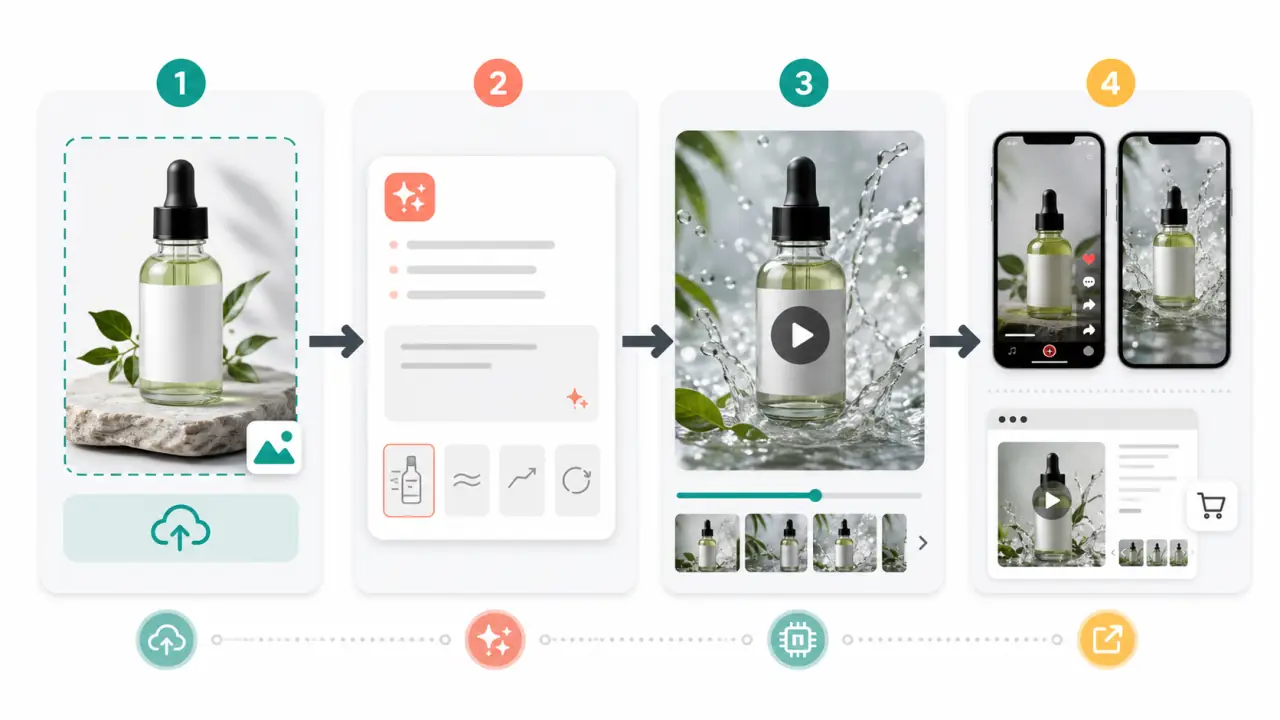
Use the workflow below to keep the product ad controlled: prepare the image, write a product-safe prompt, generate restrained motion, then export for the placement where the ad will run.
Step 1: Prepare Your Product Image
Before you upload the product photo, check whether it is suitable for motion.
Use this checklist:
- Crop the product with breathing room on all sides.
- Keep the product label readable in the first frame.
- Remove background clutter that could become animated noise.
- Avoid heavy reflections over text, logos, or packaging edges.
- Choose a version where the product is facing the viewer or angled naturally.
- If you need a vertical ad, make sure the product fits a 9:16 crop.
- If the product is transparent, glossy, or metallic, use less motion at first.
For products with important text, do not expect AI video to preserve every tiny letter perfectly. A candle label, coffee bag, supplement bottle, skincare box, or book cover can work, but the prompt should protect the label area and the final video should be reviewed carefully.
If the product packaging is the selling point, keep the motion subtle. If the product experience is the selling point, the background can carry more motion: steam for coffee, water droplets for skincare, warm glow for candles, or light movement for jewelry.
Step 2: Write a Product-Safe Motion Prompt
A vague prompt creates vague motion:
Make this product video look cool.That can produce a flashy clip, but it gives the model permission to invent. For e-commerce, invention is not always helpful. A better prompt tells the model what to animate and what to protect.
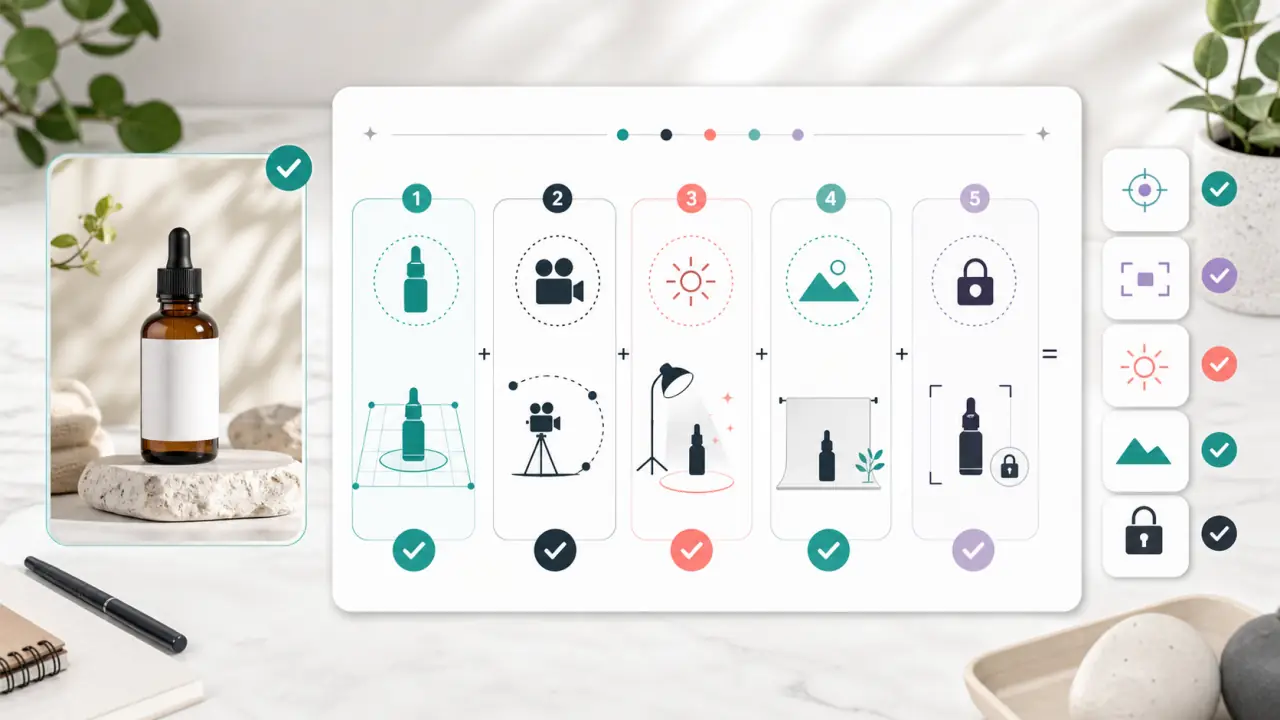
Use this formula:
Product + camera movement + light or material motion + background atmosphere + preservation constraints.For example:
Create a short premium product video from this skincare bottle photo. Slow camera push-in, soft water reflections, gentle light moving across the glass, clean spa-like background atmosphere. Keep the bottle shape, label area, cap, color, and packaging details unchanged. No warping, no new text, no extra products.The final sentence is not optional. It is the quality-control part of the prompt. Product video is different from abstract AI art because the subject is tied to a real item. If the generated product no longer matches what the customer receives, the ad is not usable.
Step 3: Generate Motion Without Warping the Product
Most product image to video failures come from asking for too much motion.
Safe product motions include:
- Slow camera push-in
- Gentle camera pull-back
- Subtle orbit around a centered product
- Soft light sweep across the packaging
- Slight reflection movement on glass or metal
- Background steam, mist, glow, leaves, fabric, or shadow movement
- Small depth movement that keeps the product still
Risky motions include:
- Product transforming into another object
- Fast 360-degree spin from a single flat image
- Liquid pouring from a sealed bottle
- Hands picking up the product when no hands exist in the source image
- Dramatic explosions, melting, bending, or folding
- Close-up camera moves that force the model to invent missing details
The safest first generation is usually a controlled product hero shot. Once you have one stable version, create variations by changing the mood, crop, or background motion. That is better than pushing one prompt until the model starts rewriting the product.
Step 4: Export for Ads, Product Pages, and Social
The same product video should not be used everywhere without adjustment.
| Placement | Best ratio | Best duration | Motion style | What to watch |
|---|---|---|---|---|
| TikTok-style feed | 9:16 | 5-8 seconds | Fast hook, clear product, room for caption | Product must be readable on a phone |
| Instagram Reels or Stories | 9:16 | 5-8 seconds | Polished vertical motion | Avoid placing the product behind UI buttons |
| Product page loop | 1:1, 4:5, or 16:9 | 4-8 seconds | Calm loop, subtle motion | Do not distract from add-to-cart content |
| Paid social ad | 9:16 or 4:5 | 5-10 seconds | Hook plus one benefit cue | Test multiple angles, not just one pretty clip |
| Landing page hero | 16:9 | 6-12 seconds | Slow cinematic motion | Leave negative space for headline and CTA |
For social ads, vertical framing matters. Keep the product away from the far right edge because short-video interfaces often place like, comment, share, and save controls there. Keep important text away from the bottom because captions, music labels, and call-to-action overlays can cover it.
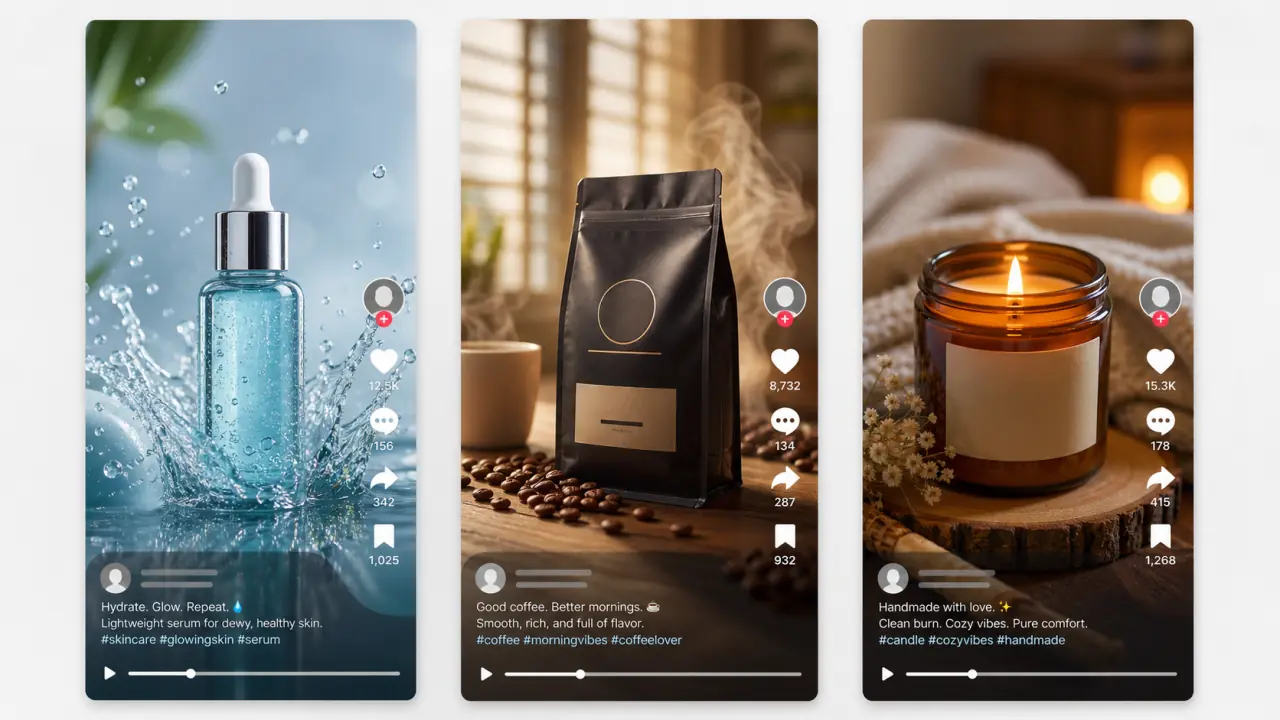
The example above shows the kind of output direction to aim for: the product stays central, the motion idea is immediately readable, and the interface area does not hide the item. Treat this as a layout preview rather than a final platform screenshot. The actual caption, offer, audio, and call to action should be added after you know which product motion is stable.
Product Image to Video Prompt Examples
Use these as starting points. Replace the product details with your own item, then adjust the motion based on the first result.
Skincare Bottle Ad
Create a 7-second vertical product ad from this skincare bottle photo. Slow camera push-in, clean water droplets moving in the background, soft blue-white studio light, premium fresh skincare mood. Keep the bottle shape, cap, label area, color, and packaging details unchanged. No warped text, no extra bottles, no hands.Coffee Bag Ad
Turn this coffee bag product image into a warm short ad. Slow camera push-in, gentle steam rising behind the bag, morning window light, subtle coffee beans in the foreground. Keep the bag shape, front label, logo placement, color, and package edges unchanged. No new text, no deformation, no people.Candle Product Ad
Create a cozy product video from this candle photo. Slow cinematic push-in, warm flame glow, soft shadows moving across the background, calm handmade product mood. Keep the jar shape, label area, wax color, glass color, and product size unchanged. No melting jar, no label changes, no extra objects.Jewelry Detail Ad
Animate this jewelry product photo with a subtle premium light sweep and slow macro camera movement. Add soft reflections on the metal and a clean dark studio background. Keep the jewelry shape, stones, color, and arrangement unchanged. No extra gems, no warped chain, no text.Sneaker Product Ad
Create a short sneaker product ad from this still image. Slow side-to-front camera move, soft studio light, subtle shadow movement on the floor, clean athletic mood. Keep the shoe shape, sole, logo area, laces, color, and material unchanged. No extra shoes, no foot, no bending.Handmade Product Ad
Turn this handmade product photo into a calm social ad. Slow camera push-in, warm natural light, soft background movement, tactile craft mood. Keep the product shape, texture, label, color, and handmade details unchanged. No new props, no distorted edges, no text changes.Common Problems and Fixes
Product ads are easy to judge because the output either still looks like the real product or it does not.
| Problem | Likely cause | Better fix |
|---|---|---|
| Product label changes | The prompt asks for too much motion or text is too small | Add "keep label area unchanged" and use a clearer source image |
| Bottle or box bends | Motion is too dramatic | Use slow push-in or light movement instead of rotation or transformation |
| Product melts into background | Background and product edges are too similar | Improve contrast, use a cleaner crop, reduce atmospheric effects |
| Video feels too slow for social | The shot has no hook | Add a clear first-frame product view and a stronger light or background cue |
| Video feels fake | Prompt asks for impossible action from one image | Use plausible camera movement and environment motion |
| UI covers the product in vertical ads | Product is too close to right or bottom edge | Reframe for 9:16 with safe space for buttons and captions |
| Paid ad looks generic | Motion is polished but not tied to the offer | Create separate versions for benefit, mood, season, and audience angle |
The fix is usually not a longer prompt. It is a clearer boundary. Tell the model what must remain unchanged, reduce motion, and generate one short test before committing to final exports.
When One Product Photo Is Not Enough
One product image is enough for a simple short ad, but it is not enough for every product video.
Use more images when:
- The product has important back-side or side details
- The ad needs a real use case, not just a hero shot
- The packaging has tiny text that must remain readable
- You need a close-up texture shot and a full product shot
- The product bundle includes multiple items with different shapes
- The first AI video changes details that customers would notice
For a launch, one strong product photo can become the first short ad. After that, you can expand the campaign with more variations: detail clips, email banners, product page loops, paid ad tests, and launch-day reveals. The existing guide on turning one product photo into a 7-day launch video campaign is a better next step when you want a full content calendar rather than one short ad.
Product Video Ad Review Checklist
Before publishing, pause the video at the first frame, middle frame, and last frame.
Check:
- Does the product still match the real item?
- Did the label, logo, color, shape, or size change?
- Is the product clear on a phone screen?
- Does the motion support the product instead of distracting from it?
- Is there safe space for captions, platform UI, and CTA overlays?
- Does the clip loop cleanly if used on a product page?
- Are you allowed to use the source image and final video in ads?
If the answer is not clear, treat the output as a draft. AI video is useful for fast creative testing, but product accuracy still matters. A beautiful clip that misrepresents the item can hurt trust faster than a plain static image.
FAQ
Can I turn one product image into a video ad?
Yes. One clean product image can become a short AI video ad if the motion is restrained and the prompt protects the product. The best first version is usually a simple hero shot with a slow camera move, light movement, and stable packaging.
What is the best motion for product image to video?
Slow camera movement, light sweeps, reflection shifts, steam, glow, water droplets, and background motion are usually safer than dramatic product movement. The product itself should stay stable unless you have multiple reference angles.
How do I keep the logo and label from changing?
Use a sharp source image and add explicit constraints: keep the logo, label, packaging, product shape, color, and material unchanged. Avoid prompts that ask for fast rotation, close-up transformations, or new text overlays.
Should I make AI product videos vertical?
Use vertical 9:16 when the clip is for TikTok-style feeds, Reels, Shorts, or Stories. Use 16:9 for landing pages, YouTube, or hero sections. Use square or 4:5 only when the placement benefits from it.
Can I use AI product videos for paid ads?
Yes, but review the tool terms, source image rights, and platform rules before publishing. Also make sure the video does not change the product in a way that could mislead customers.
What should I do if the AI video looks fake?
Reduce the motion, simplify the background, and make the prompt more specific about what should stay unchanged. Start with a 5-8 second test rather than asking for a full commercial in one generation.
Conclusion
Product image to video works best when it is treated as a controlled ad workflow, not a magic product commercial button. Start with a clean photo, use one motion idea, protect the product details, and export for the placement where the clip will actually be used.
Upload one product photo, create the first short ad variation, then compare subtle motion against a stronger social version. The version that keeps the product accurate while making the offer easier to notice is the one worth testing.