
 ChatGPT
 Perplexity
 Gemini
 Claude
A practical guide for creators, marketers, designers, and small business owners who want better AI video results from a single image
Everyone is talking about AI video generation.
But the more useful question isn't whether AI can turn a photo into a video.
It can.
The better question is:
Why do some AI-generated videos look cinematic and intentional, while others look random, distorted, or strangely lifeless?
After testing dozens of image-to-video workflows and studying how creators actually use them, I've come to a simple conclusion:
The key is not turning a photo into a video. The key is directing a short shot from a still image.
Most people treat photo to video AI like a magic button.
The people getting the best results treat it like a tiny filmmaking workflow.
That mindset changes everything.
Most people are solving the wrong problem
When beginners try a photo-to-video tool for the first time, they usually focus on the AI model.
They ask:
- Which model is best?
- Which platform has the highest quality?
- Which tool creates the most realistic motion?
Those questions matter.
But they are not the biggest factor.
The surprising thing is that the quality of the result often depends more on:
- The starting image
- The motion direction
- The camera movement
- The constraints you give the model
Not the model itself.
Think about it this way.
If you hand a photographer a blurry, crowded image with no focal point, it doesn't matter how expensive the camera is.
The same thing happens with AI video generation.
The image becomes the first frame.
Everything starts there.
A better way to think about photo-to-video AI
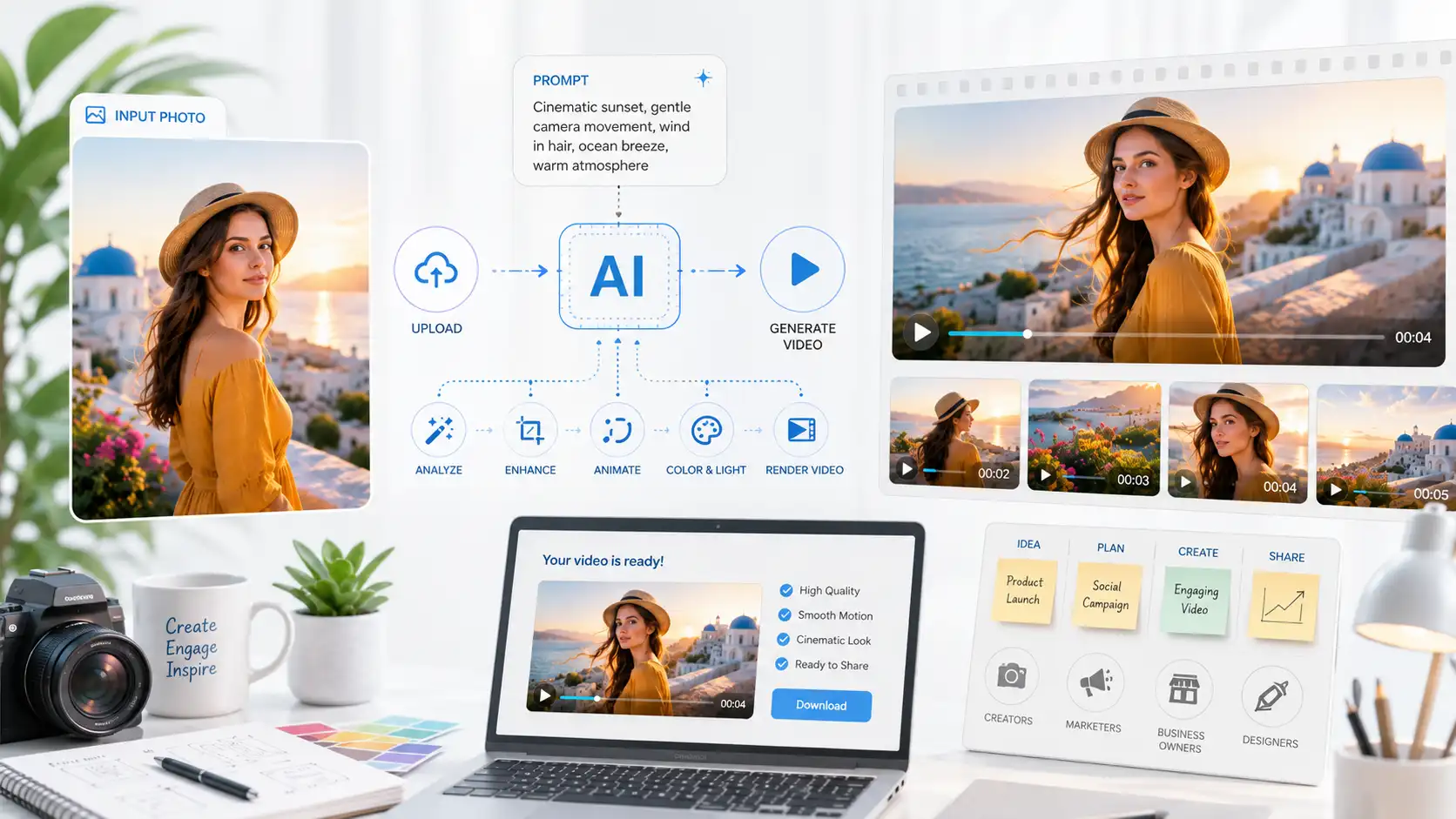
Most people think photo animation works like this:
Photo → AI → Video
A better mental model is:
Photo → First Frame → Motion Direction → Video
That sounds like a small distinction.
It isn't.
Once you realize the image is acting as the opening frame of a scene, your prompts become dramatically better.
Instead of asking:
Make this image move.
You start asking:
What should move?
How should the camera move?
What should stay unchanged?
Those are directing decisions.
And AI video models respond surprisingly well to them.
The four-layer framework
To make this practical, I think every successful AI photo animation contains four layers.
Layer 1: Subject motion
This is the main action.
The subject might:
- blink
- breathe
- rotate
- walk
- smile
- turn their head
The biggest mistake people make is asking for too much.
Subtle motion usually beats dramatic motion.
A portrait with natural blinking and gentle breathing often looks more realistic than a portrait attempting a full dance sequence.
Layer 2: Environmental motion
This is where the scene comes alive.
Examples include:
- drifting clouds
- moving water
- floating particles
- rising steam
- swaying trees
- shifting light
This layer is massively underrated.
In practice, environmental motion often contributes more realism than subject motion.
A still character with moving clouds and changing sunlight can feel alive.
A wildly moving character inside a frozen world often feels fake.
Layer 3: Camera motion
This is where many beginners struggle.
The camera is often more important than the subject.
Simple camera movements include:
- slow push-in
- zoom out
- gentle pan
- orbit
- handheld movement
A product image with a slow push-in immediately feels more premium.
A portrait with a subtle cinematic zoom often feels more emotional.
A landscape with a slow pan creates depth that wasn't visible in the original image.
The key is restraint.
Most successful AI videos use one camera movement, not five.
Layer 4: Preservation instructions
This is the layer most people forget.
AI models are creative.
Sometimes too creative.
You need to tell the model what must remain stable.
For example:
- preserve facial identity
- preserve product shape
- preserve logo placement
- preserve artwork style
- preserve room layout
Without constraints, the model may solve the motion problem by changing the image itself.
That's rarely what you want.
Start with the right image
The quality of your source image has a bigger impact than most people realize.
Across different AI video platforms, the same pattern keeps appearing:
The best results start with simple images.
Not complex ones.
A strong starting image usually has:
- one clear subject
- good lighting
- enough empty space around the subject
- visible depth
- a clean composition
For example:
Product photos
Product photos are ideal.
A bottle, watch, sneaker, coffee bag, or cosmetic product already has a clear focal point.
Adding a light sweep, subtle rotation, and camera push-in can create something that feels remarkably close to a commercial shot.
This is one reason many marketers are starting to use AI video generation for creative testing before investing in a full production shoot.
Portraits
Portraits are another strong use case.
The best results usually come from:
- one face
- clear lighting
- minimal distractions
Instead of forcing dramatic actions, try:
- blinking
- breathing
- subtle head movement
- background atmosphere
If your goal is to animate a photo for social content, small changes often feel the most believable.
Landscapes
Landscape images already contain natural motion opportunities.
Clouds.
Water.
Fog.
Light.
Trees.
The goal isn't to animate everything.
The goal is to animate the parts viewers already expect to move.
Use prompts differently
One of the biggest shifts people need to make is learning what prompts are actually for.
Most beginners use prompts to describe the image.
But the image already exists.
The model can see it.
If the image already contains:
- a woman
- a mountain
- a lake
- sunset lighting
You don't need to spend half your prompt repeating those details.
Use the prompt for motion.
Not description.
A simple formula works surprisingly well:
Subject motion + Camera motion + Atmosphere + Preservation
For example:
Portrait:
Natural blinking and subtle breathing, slow cinematic push-in, soft background light movement, preserve facial identity and expression.
Product:
Slow product rotation, premium studio light sweep, subtle camera push-in, preserve label placement and package shape.
Landscape:
Clouds drifting slowly across the sky, gentle movement in the trees, cinematic slow pan, preserve natural lighting and mountain shape.
Simple.
Focused.
Predictable.
Four real-world workflows
The most useful examples are rarely the flashiest ones.
They are the ones people actually use.
For creators
Creators often already have strong images.
The challenge is producing more content.
Instead of creating an entirely new video, they can turn:
- portraits
- travel photos
- artwork
- pet photos
into short clips for Reels, Shorts, TikTok, Pinterest, or stories.
The goal isn't filmmaking.
It's increasing content velocity.
For marketers
Marketers are increasingly using image-to-video workflows for creative testing.
Instead of producing ten video concepts, they can generate ten motion variations from a single product image.
Some examples:
- product reveals
- launch teasers
- email campaign visuals
- landing page motion assets
- paid social concepts
A practical image to video AI workflow does not replace production completely.
The surprising thing is that it dramatically lowers the cost of experimentation.
For small business owners
Many small businesses have photos.
Few have video teams.
Restaurants, real estate agents, coaches, ecommerce stores, and local brands can create short motion assets from images they already own.
A menu item becomes a moving social post.
A property photo becomes a walkthrough-style teaser.
A product image becomes a launch animation.
The workflow is often good enough to create content that otherwise wouldn't exist.
For designers
Designers have perhaps the most interesting use case.
A static concept suddenly becomes a moving concept.
Mood boards.
Packaging.
Illustrations.
Brand assets.
Portfolio work.
Instead of showing the final design, designers can show the direction of the design.
That creates a much richer presentation.
What still doesn't work well
It's important to acknowledge the limitations.
AI video generation is improving quickly.
But it still struggles with:
- multiple faces
- crowded scenes
- exact typography
- logos
- hands
- complex choreography
- strict identity preservation
I'm not saying these problems can't be solved.
I'm saying they're still common.
The best creators know when to simplify the task.
A clear image with one clear motion direction usually beats a complicated scene with ten competing actions.
The biggest takeaway
A few patterns stood out while testing these workflows.
The best AI videos are rarely the most dramatic.
They are the most controlled.
The source image provides:
- subject
- composition
- lighting
- style
The prompt provides:
- motion
- camera direction
- atmosphere
- constraints
Once you separate those responsibilities, your results become far more predictable.
That's the real unlock.
Not a better model.
Not a longer prompt.
A better workflow.
What to try next
If you're new to photo-to-video AI, don't start with your hardest image.
Pick something simple.
A portrait.
A product photo.
A landscape.
A piece of artwork.
Then use this formula:
Subject motion + Camera motion + Atmosphere + Preservation
Generate a few versions.
Compare them.
Simplify when necessary.
You'll learn more from five focused generations than from fifty random ones.
And if you're looking for a practical way to turn a photo into video with AI, try a tool built specifically around motion prompts, camera movement, and creative control.
With PhotoToVideoAI, you can start from a single image, test different animation ideas, and explore what works for portraits, products, artwork, landscapes, and social content.
The goal isn't to make everything move.
The goal is to make the right thing move.